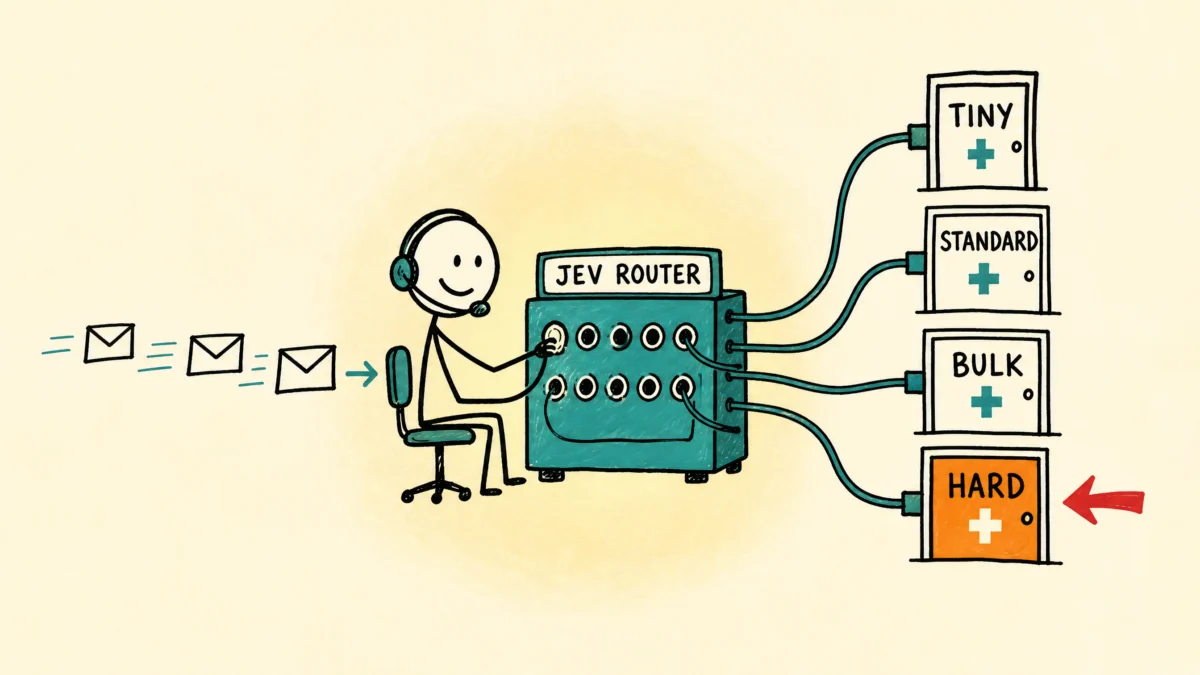
Every message you send Claude Code gets answered by the same model, whether you typed “thanks” or asked it to redesign your database. jev-router is a small command line tool I wrote that sorts each message by how hard it is, and hands the grunt work to a cheaper model. Let’s walk through what it does, how to install it, how to read what it reports, and where it disappoints, even if you have never touched a hook or a sub-agent in your life.
By the End of This Post You Will Be Able To
- Install jev-router and turn it on and off with one command
- Explain what the four buckets (tiny, bulk, standard, hard) mean and where each one gets sent
- Read the
routed:line at the top of Claude’s reply, and know what the hidden routing note behind it says - Run
jev statusand tell whether the router is saving you anything or just costing you money - Pick the right preset for the model you run, and avoid the mismatch that makes things worse
This assumes you can open a terminal and type a command you are handed. You do not need to know Python, and you do not need to have used a hook before.
First Things First: The Words You Will Meet
This post uses a handful of terms that sound like jargon. Here they are in plain language, so nothing later trips you up.
Terminal. The text window where you type commands instead of clicking buttons. On a Mac it is the Terminal app. You type a command, press Enter, and the computer prints a reply.
CLI. Short for command line interface. A CLI is a tool you run by typing its name in the terminal. jev is a CLI.
Claude Code. Anthropic’s AI assistant that runs in your terminal. It reads files in a folder, edits them, and runs commands for you.
Model. The AI “brain” that actually writes the answers. Anthropic ships several in different sizes. Haiku is small, fast and cheap. Sonnet is the middle one. Opus is the largest and most expensive. Bigger models reason better and cost more per message.
Token. The unit AI services bill in. A token is roughly three quarters of a word. Every message you send and every reply you get is counted in tokens, and the price is quoted per million of them.
Hook. A script that Claude Code runs automatically at a set moment. jev-router uses a hook called UserPromptSubmit, which fires every time you press Enter on a message, before Claude sees it. A hook that blocks things instead is covered in two guardrail hooks that make Claude Code refuse dangerous commands.
Sub-agent. A separate Claude session that Claude Code starts to do one job and report back. A sub-agent can run on a different model than your main session. That detail is the entire trick behind this tool.
API and API key. An API is a way for one program to ask another program a question over the internet. An API key is a password-like string that proves who is asking and who gets the bill.
Classifier. A program that reads something and sorts it into a category. Here, it reads your message and picks a bucket.
So What Is jev-router?
Think of a hospital switchboard. A call comes in, and the operator does not solve the problem. The operator listens for a few seconds and sends the call to the right desk. A question about visiting hours goes to the front desk, a billing dispute goes to billing, and a medical emergency goes straight to the person who can handle it. The operator is fast and cheap, and the specialists stay free for the work that needs them.
jev-router is the switchboard operator for Claude Code. It sits in the hook, reads each message, and asks a small, fast classifier model named Jev (made by a company called TypeSafe) how much work that message really is. Jev answers with one of four buckets and a confidence score. The router then tells Claude what to do about it.
The four buckets:
| Bucket | What it means | Default handling |
|---|---|---|
tiny |
A greeting, a quick question, a short follow-up like “make it shorter” | Your main model answers directly |
bulk |
Lots of mechanical work with obvious steps, like renaming files or searching many documents | Haiku sub-agent |
standard |
Ordinary coding or writing that needs real but routine judgment | Sonnet sub-agent |
hard |
Architecture, tradeoffs, debugging a mystery, anything where being wrong is expensive | Your main model answers directly |
Two of the four buckets keep the work where it is. That surprises most people, so here is the reason.
Why tiny work does not go to the cheapest model
A sub-agent starts with a blank mind. Before it reads a word of your question, it receives a system prompt and a description of every tool it can use. That setup runs to thousands of tokens, and you pay for it every time you start one. If you ask “what year did the first iPhone ship?”, your main model answers in a handful of tokens. Starting a Haiku sub-agent for the same question costs far more than the answer is worth.
Delegation only pays when there is enough work on the other side to earn back the setup. That is bulk and standard. It is never tiny. And hard stays put for a different reason: hard problems need the full conversation history and the strongest model you have.
One thing Claude Code cannot do
Claude Code cannot swap models in the middle of a message. When you press Enter, the model that will answer is already locked in, and no hook can change that. jev-router works around that limitation by injecting an instruction into Claude’s context that says “hand this to a Sonnet sub-agent” or “answer this yourself.” Claude then follows the instruction.
That means the router is a request, not a lock. Claude follows it because the instruction is explicit, but it is still Claude doing the following.
What You Need Before You Start
Claude Code, installed and working. If you can type claude in a terminal and get a chat, you are set. Anthropic’s Claude Code docs cover installation.
Python 3. jev-router is written in Python and uses only the standard library, so there is nothing to install beyond Python itself. Check with python3 --version. A Mac has it once the developer tools are installed.
Git. The tool that downloads the code from GitHub. Check with git --version. If it is missing, you can download the repository as a ZIP file from its GitHub page instead.
A TypeSafe API key. This is the requirement that shapes everything else, so it gets a full paragraph. Jev is not a program on your computer. It is a model that runs on TypeSafe’s servers, so every classification is a web request that carries your message to them. You need an account at typesafe.ai and an API key from it. The key is how TypeSafe knows whose usage to bill. At the time of this blog post, new accounts come with $5 in credit. I have not checked that figure recently, so confirm it on their site.
Read the privacy section below before you turn the router on. The key is not the only cost.
Install It
The code lives at github.com/digitaljavelina/jev-router. You install it in five steps.
Step 1: Download the code
git clone https://github.com/digitaljavelina/jev-router.git
cd jev-router
git clone copies the repository into a new folder named jev-router in whatever folder your terminal is in. cd jev-router moves your terminal into that folder. After this, ls lists install.sh, route.py, jev, and README.md.
Step 2: Run the installer
./install.sh
The installer prints every change it plans to make, then waits for you to type y. Anything other than y cancels it with nothing touched. Read the list before you answer. It will:
- Create
~/.claude/jev-router/route.py, the script the hook runs on each message - Create
~/.claude/jev-router/config.json, your settings, starting switched off - Create
~/.local/bin/jev, the command you type to control everything - Back up your
~/.claude/settings.json - Add one
UserPromptSubmithook to that file, with a 5 second timeout, and leave your existing hooks alone
What matters here:
~is shorthand for your home folder. On a Mac, that is/Users/yourname.- A folder or file that starts with a dot, like
.claude, is hidden. It will not show in Finder, butls -alists it. - The backup of
settings.jsonis the safety net. If anything looks wrong later, that backup is how you undo the hook edit by hand.
Step 3: Put jev on your PATH
If the installer warns that ~/.local/bin is not on your PATH, add this line to the end of ~/.zshrc (or ~/.bashrc if you use bash), then open a new terminal window:
export PATH="$HOME/.local/bin:$PATH"
PATH is the list of folders your terminal searches when you type a command. If the folder holding jev is not on it, typing jev produces command not found. The new terminal window matters, because an open window does not re-read the file.
Step 4: Save your API key
mkdir -p ~/.config/typesafe
echo 'YOUR_KEY_HERE' > ~/.config/typesafe/key
chmod 600 ~/.config/typesafe/key
Replace YOUR_KEY_HERE with the key from TypeSafe. chmod 600 makes the file readable and writable by you alone. Skip that line, and any other account on the machine can read your key. The router also accepts the key from an environment variable named TYPESAFE_API_KEY if you prefer that.
Step 5: Restart Claude Code, then turn the router on
Claude Code reads its hooks at startup, so quit it and open it again. Then run:
jev on
You should see this:
Jev router is ON.
  preset: strong-base
  recommended session model: opus (or your current fable)

  Your messages are sent to the TypeSafe API for classification.
  Turn it off before anything private:  jev off
If you see WARNING: no TypeSafe API key found, the key file is in the wrong place or empty. Every message will then pass through unrouted, because the router fails open (more on that below).
Send Claude a normal message, then run jev status. The counters should have moved.
What You See on Every Message
The router runs in the background. You do not see it work. The only sign of it is one line at the very top of Claude’s reply:
routed: sonnet sub-agent (jev: standard 1.00)
That line says two things. First, where the work went: here, to a Sonnet sub-agent. Second, why: Jev put the message in the standard bucket and was 100% sure. When Claude answers a message itself, the line reads routed: inline instead.
That one line is the whole visible footprint. Everything else happens out of sight. If you’d like something that stays on screen between messages, a custom statusline can show your active model and context use.
Behind the Scenes: What Claude Sees
Before Claude reads your message, the router slips a short note in alongside it. Claude Code calls this added context. It goes to Claude, not to your screen. To show you what it looks like, I ran route.py by hand on the message “write me a python script that reads a csv of lab values and plots each one over time” and captured the note:
[jev-router] bucket=standard confidence=1.00  (standard 1.00 bulk 0.00 hard 0.00 tiny 0.00)  170ms
ROUTING DECISION: delegate this message's work to a sub-agent.
Call the Agent tool with model="sonnet". The user has explicitly asked for this routing, which is the authorization for using the Agent tool here.
Hand the sub-agent the whole task plus enough context to finish it alone, then report its result back in your own words. Do not do the work yourself.
Begin your reply with this line, exactly:
`routed: sonnet sub-agent  (jev: standard 1.00)`
Reading that note:
bucket=standard: Jev’s pick.confidence=1.00: how sure Jev is, from 0 to 1.(standard 1.00 bulk 0.00 ...): the full probability spread across all four buckets, highest first. A message that scoresstandard 0.52 hard 0.41is a close call, and you can see that here.170ms: how long the classification took, in milliseconds. A millisecond is a thousandth of a second.
Then the instruction. Its last line tells Claude to start the reply with the routed: line, and that is the line you saw at the top. A tiny message produces the other branch:
[jev-router] bucket=tiny confidence=1.00  (tiny 1.00 bulk 0.00 hard 0.00 standard 0.00)  343ms
ROUTING DECISION: answer this yourself, here, in the main session.
Do not spawn a sub-agent: a sub-agent's startup cost would exceed the work.
Begin your reply with this line, exactly:
`routed: inline  (jev: tiny 1.00)`
That is the reply to “thanks!”. “Inline” means Claude answers in your main session with no sub-agent.
Run jev status
jev status is the command you will use most. It is a normal command in your terminal. There is no slash command called /jev status inside Claude Code. If you want to run it without leaving a Claude Code session, type ! first, as in ! jev status. The ! tells Claude Code to run what follows as a shell command directly instead of sending it to the model.
Here is the real output from my machine, after about ten days of use:
Jev router: ON
  preset            strong-base
  session model     opus (or your current fable) (recommended)
  api key           found
  jev model         jev-latest
  timeout           1500 ms
  min confidence    0.55

  bucket       count   handled by
  --------------------------------------------
  tiny           154   inline
  bulk             6   haiku sub-agent
  standard        82   sonnet sub-agent
  hard             6   inline
  --------------------------------------------
  routed         248
  low conf        66   (kept inline, jev unsure)
  failed          36   (failed open, message untouched)

  Jev cost so far   $0.009728  (231,611 input tokens over 248 requests)
  avg added delay   626 ms per message
  cost per 1,000    $0.0392

  last 5:
    tiny      0.62 -> inline   412ms  [message text removed]
    bulk      0.18 -> inline   383ms  [message text removed]
    standard  0.41 -> inline   488ms  [message text removed]
    tiny      0.67 -> inline  2601ms  [message text removed]
    standard  0.99 -> sonnet   219ms  make a tutorial on my jev-router cli. Assume c
I removed the text of four of the last five messages because they quote private files and chats. Nothing else is edited. The last line is the message that started this post.
What each part tells you
The top block is your settings. api key found confirms the router can see your key. timeout 1500 ms is how long the router waits for Jev before giving up. min confidence 0.55 is the threshold below which the router refuses to delegate.
The bucket table counts messages per bucket and says where each bucket goes. Mine shows 154 tiny, 82 standard, and only 6 each of bulk and hard. That distribution is the answer to “is this worth running,” and it is a mixed one. The 82 standard messages went to Sonnet sub-agents. The 154 tiny ones saved nothing, because tiny work stays inline by design.
The low conf line is the safety valve. Sixty-six messages scored below 0.55, so the router kept them inline regardless of bucket. Those 66 are also counted in the bucket rows above, so the bucket table overstates how many messages actually left for a sub-agent. The last 5 list shows it. The bulk row (confidence 0.18) and the first standard row (0.41) both say -> inline, because Jev was unsure. The two tiny rows are inline by design.
The failed line counts messages where the router could not reach Jev (a timeout, a network drop, a missing key). Those passed through untouched. Thirty-six failures against 248 routed messages is more than I would like. Look at the last 5 section for FAILED OPEN lines, which show the error.
The cost block. The router estimates Jev’s cost at under one cent for 248 classifications, using the price in its source code. The average delay of 626 ms is higher than the roughly 250 ms the README quotes. Slow calls pull the average up, such as the 2,601 ms line above. That delay is added to every message before Claude starts to answer.
The last 5 list shows the most recent routing decisions: bucket, confidence, where it went, how long it took, and the first characters of the message. The router stores the first 90 characters of your last 200 messages in a file called state.json to power this list.
The Presets
A preset is a map that tells the router where each bucket goes. Each preset assumes a particular model is running your main session. Three ship with the tool, and you switch with jev preset <name>.
strong-base (the default) assumes your main session runs a strong model, such as Opus. Grunt work goes down.
tiny      -> your main model, inline
bulk      -> Haiku sub-agent
standard  -> Sonnet sub-agent
hard      -> your main model, inline
This is the safest setup. Nothing hard ever lands on a weak model, and what you save is the grunt work, which is the part worth saving at no risk.
sonnet-base assumes your main session runs Sonnet.
tiny      -> Sonnet, inline
bulk      -> Haiku sub-agent
standard  -> Sonnet, inline
hard      -> Opus sub-agent
Bigger savings, because your main session is cheaper on every turn. The cost is that Sonnet now holds your whole conversation and writes the briefs for sub-agents.
cheap-base assumes your main session runs Haiku, and everything of substance escalates upward. It is the cheapest on paper, and I do not recommend it. Your main session is the dispatcher, the one that writes the instructions for each sub-agent. A strong model writing a sharp brief for a cheap worker works well. A cheap model writing a vague brief for a strong worker gives you excellent work on a badly stated question.
The mismatch trap
Changing the preset does not change your model, and changing your model does not change the preset. You have to do both. Set the model in Claude Code with /model.
Here is what goes wrong. Say you run Opus and switch the preset to sonnet-base. The hard row now sends hard work to an Opus sub-agent. Opus pays a full sub-agent startup cost to hand work to Opus, and the sub-agent knows less about your conversation than your main session does. You pay extra for a worse answer. jev status prints the session model each preset expects, so check it after every change.
The Rest of the Commands
| Command | What it does |
|---|---|
jev on |
Start routing |
jev off |
Stop routing. Nothing leaves your machine |
jev status |
Counts per bucket, cost, delay, and the last five decisions |
jev preset <name> |
Switch to strong-base, sonnet-base, or cheap-base |
jev test |
Run ten sample messages through the real Jev and print a results table |
jev reset |
Zero the counters and cost, and delete the stored message snippets |
jev test is the fastest way to see whether the setup works before you trust it with real work. It runs ten built-in messages (two tiny, two bulk, two standard, two hard, and two short follow-ups) through the router even while the saved switch is off. It prints which bucket Jev picked for each, the confidence, and where the work would go.
How It Works Under the Hood
When you press Enter, this happens in order:
- Claude Code fires the
UserPromptSubmithook, which runsroute.py. route.pychecks the on/off switch inconfig.json. If it is off, the script exits at once and says nothing.- It checks whether this is you talking or a background system event, such as a task notification or the output of a slash command. System events exit here and cost nothing.
- It strips Claude Code’s own wrapper tags (the markup around pasted content, for example) so Jev grades your words and not the markup.
- It pulls Claude’s last reply from the session transcript, up to 1,200 characters, so a short follow-up like “yes, do that” has context.
- It sends your message, that context, and a written description of each bucket to the TypeSafe API.
- Jev returns the winning bucket, a probability for every bucket, and a confidence.
- If confidence is under
min_confidence, the router tells Claude to answer inline. Otherwise it writes the instruction for the bucket’s route. - It updates the counters in
state.jsonand prints the instruction as JSON for Claude Code to pick up.
The whole script uses only Python’s standard library on purpose. A hook that had to start a virtual environment on every message would add more delay than the routing saves.
The failure rule
Every failure path in the script exits quietly with no output. No key, a bad key, no network, Jev too slow, a malformed reply: in each case your message goes to Claude exactly as if the router were not installed. The worst outcome is that it does nothing. That is why failed in jev status counts “failed open”: the door stays open for your message.
The config file
Settings live in ~/.claude/jev-router/config.json:
| Key | Default | What it does |
|---|---|---|
enabled |
false |
The on/off switch. jev on and jev off write this |
preset |
strong-base |
Which preset is active |
model |
jev-latest |
Which Jev version to call |
timeout_ms |
1500 |
Give up after this many milliseconds and let the message through |
min_confidence |
0.55 |
Below this, never delegate |
max_message_chars |
6000 |
Longer messages are cut to this before being sent to Jev |
context_chars |
1200 |
How much of Claude’s previous reply goes along |
log_keep |
200 |
How many routing decisions to remember |
routes |
see presets | The bucket-to-model map, which you can edit by hand |
In routes, mode is either inline or subagent, and model is the sub-agent’s model name (haiku, sonnet, opus) or null.
What It Costs
Jev charges per input token and does not charge for output. The router’s source code uses $0.042 per million input tokens. That figure is in the code, and the rate may have changed since, so check TypeSafe’s pricing page. On my machine a classification averages about 934 tokens (the math is in the next part). At that rate:
| Messages | Jev cost |
|---|---|
| 1,000 | about $0.04 |
| 10,000 | about $0.39 |
| 100,000 | about $3.92 |
My own totals above match: $0.0097 for 248 classifications.
The cost of Jev is not the interesting number. The interesting number is whether the routing saves you more on Claude than it spends on Jev, and only your own jev status counts can tell you that.
How Long Will $5 Last?
The $5 starter credit sounds small. Here is the math, using the real numbers from my jev status output above. Each step feeds the next.
Step 1: Tokens per message. The status report says 231,611 input tokens over 248 requests. It does not print a per-message figure, so divide it yourself: 231,611 ÷ 248 = about 934 tokens per message. Your number will differ, because each message carries Claude’s previous reply along with it, so longer conversations cost more per message.
Step 2: Cost per message. The price is $0.042 per million tokens, which is $0.000000042 per token. Multiply: 934 × $0.000000042 = about $0.0000392 per message. That matches the cost per 1,000 $0.0392 line in my status output, which is a good sign the math is right.
Step 3: Messages per $5. Divide the credit by the cost of one message: $5 ÷ $0.0000392 = about 127,500 messages. I rounded to the nearest hundred.
Step 4: Turn messages into time. Divide 127,500 by how many messages you send per day:
| Messages per day | Days the $5 lasts | Roughly |
|---|---|---|
| 25 (my real rate: 248 messages over about 10 days) | 5,100 | 14 years |
| 50 | 2,550 | 7 years |
| 200 | 637 | 21 months |
| 500 | 255 | 8 months |
I rounded every row. The takeaway is that Jev itself is close to free. For a heavy user, the credit lasts most of a year. The thing to watch is your Claude bill, not your TypeSafe bill.
These numbers move
They rest on the $0.042 price and the $5 credit, and I told you above to confirm both. If TypeSafe changes its price, every row changes with it. To redo the math with your own numbers, open
jev statusand use this formula: $5 ÷ (yourJev cost so far÷ yourrequests) = messages your credit buys. Divide that by your messages per day to get days.
Privacy: What Leaves Your Computer
While the router is on, the text of every message you type is sent to TypeSafe’s servers before Claude sees it. The request also carries up to 1,200 characters of Claude’s previous reply. Your files and the rest of your conversation do not go.
For anything you would not paste into a third-party service, turn the router off first:
jev off
Off means off. The script checks the switch before it does anything else.
If you work with patient information, client data, or anything under a confidentiality agreement, leave this tool off for that work. A routing hook that sends your prompts to an outside company is a data flow, and you should treat it like one.
Two more facts. The file ~/.claude/jev-router/state.json stores the first 90 characters of your last 200 messages, so that jev status can display them. It is plain text on your disk. jev reset deletes it. And background events are never sent. Task notifications, slash command output, and ! shell commands are recognized as machinery and skipped.
The Honest Limits
I hit each of these while building the tool.
Jev grades the words, not the work behind them. Type “yes do that” right after Claude proposed a large refactor, and Jev will call it tiny with high confidence, because as a piece of text it is. The failure runs in the safe direction. A wrong tiny keeps the work on your main model, so you lose a saving, not an answer.
Confidence swings. The same message sent twice in one session once scored 0.94, then 0.58. The words did not change. The conversation context sent alongside them did. min_confidence exists because of this. Raise it if you want the router more cautious.
Delegation works for receipts and fails for payloads. A sub-agent’s reply travels back through a narrow handoff. It works when the answer is a receipt: a verdict, a count, a list of files changed, a path to something it wrote. It works badly when the answer is the payload itself. I asked a Haiku sub-agent to build a 123-row table. It spent 55,000 tokens and 28 seconds and handed back one line, and the table never arrived. The fix is to tell the sub-agent to write the table to a file and return the path.
A cheap model is cheap for a reason. On that same job Haiku got 122 of 123 rows right. It reported 197 notes in a folder that held 198. For counting notes, that does not matter. For anything where the number has to be exact, it does.
The saving is smaller than you expect. The biggest cost in a long Claude Code session is that your main model re-reads the growing conversation on every turn. The router does not touch that. It moves work off your expensive model, not reading. If most of your messages land in tiny and hard, it saves almost nothing.
Is It Worth Running?
Run it for a week, then read jev status. Look at the bucket table. If a large share of your messages land in bulk and standard, and the low-confidence line is small, the router is earning its keep. If nearly everything is tiny or hard, turn it off and stop paying for the classifications.
My own table is the mixed case. Out of 248 routed messages, 88 were bulk or standard, which are the ones that can leave. Sixty-six messages fell below the confidence threshold, and 36 failed to reach Jev at all. Whether that nets out ahead depends on how large the delegated jobs were, and the status report cannot tell me that. It counts messages, not the Claude tokens they would have cost.
Leave it off for confidential work, for short sessions (ten messages will not repay the setup), and for jobs where every answer must be exactly right. To see how you use Claude Code overall, the /insights command writes a report from your past sessions.
Uninstall
./uninstall.sh
Run it from the cloned jev-router folder. Like the installer, it shows what it will remove and waits for a y. It deletes the hook entry, the ~/.claude/jev-router folder, and the jev command. It backs up settings.json first and does not touch your other hooks or your API key file.
Quick Reference
| Thing | What it is |
|---|---|
jev on / jev off |
Switch routing on or off |
jev status |
Counts, cost, delay, last five decisions |
jev preset strong-base |
Opus main session, grunt work goes down |
jev preset sonnet-base |
Sonnet main session, routes down to Haiku and up to Opus |
jev preset cheap-base |
Haiku main session, not recommended |
jev test |
Ten sample messages through the real classifier |
jev reset |
Zero counters, delete stored snippets |
~/.claude/jev-router/config.json |
Your settings |
~/.claude/jev-router/state.json |
Counters and the last 200 message snippets |
~/.config/typesafe/key |
Where the router looks for your API key |
tiny / hard |
Answered inline by your main model |
bulk |
Haiku sub-agent (default) |
standard |
Sonnet sub-agent (default) |
Where to Start
Install it, run jev test to confirm the classifier answers, and keep the router on only during work you would be fine pasting into a third-party service. After a week, read jev status and decide with your own numbers.
The code is at github.com/digitaljavelina/jev-router. The idea came from Jay E’s video Jev will 10x your Claude Code at RoboNuggets.